ABOUTNEWSCONTACT US
DS_logo

Smart Tool Management System

Precisely control tools to reduce costs and production risks.

Why Implement a Tool Management System?

auto/management/pic1
  • Tool Cost Transparency
    Fully track actual usage of tools and inserts, making costs calculable, traceable, and predictable to prevent unnecessary waste.
  • Automatic Tool Preparation by Work Order
    System automatically expands tool requirements according to work orders, preventing under-preparation, overstocking, or omissions, improving efficiency and reducing human error.
  • Tool Life Visualization
    Monitor tool life in real time with early warnings to avoid premature replacement or overuse that could lead to scrap or downtime.
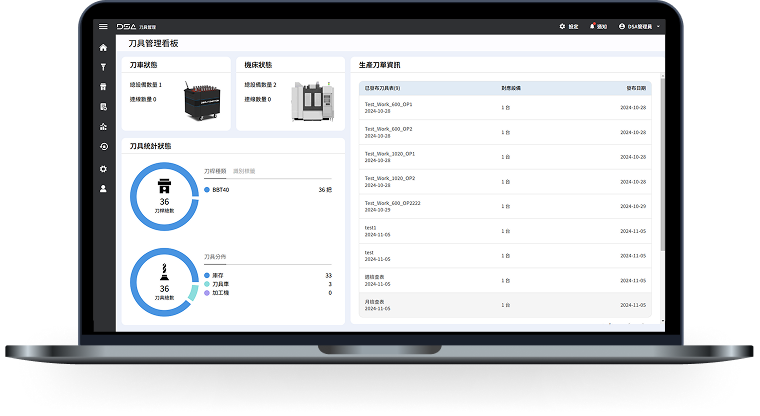
  • Transparent Inventory Management
    Tool room, line-side warehouse, and vending machine inventories are visualized to prevent over-purchasing or shortages that can halt production lines.
  • Standardized Processes, Independent of Experience
    All tasks such as tool picking, assembling, measuring, and repair are SOP-based, reducing reliance on individual experience and ensuring consistent quality.
  • Reduce Misuse, Breakages, and Unexpected Downtime
    Instant tool status monitoring avoids misuse, breakage, and unexpected machine stoppages, lowering downtime losses and hidden costs.
  • Support for Procurement and Engineering Decisions
    Records of tool life, brand differences, and reasons for scrap provide bases for optimal procurement and engineering improvements, reinforcing full life cycle management (TCO).

Main Functions of DS Tool Management System

1

Standard Tool Setup and Work Order-Oriented Assembly

  • Establish tool tables and life benchmarks through test cuts, automatically expanding assembly requirements
  • Ensure consistent processes and full traceability
2

Tool Room and Smart Vending Machine Management

  • RFID/engraving controls for tool storage, issuing, return, and scrapping
  • Real-time inventory sync to avoid shortages or repeat issues
3

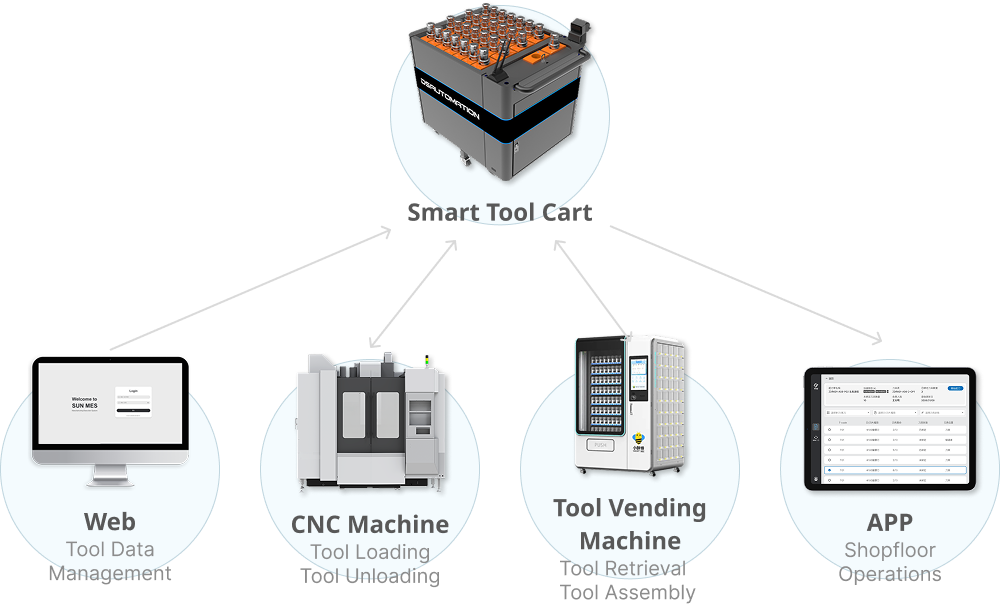
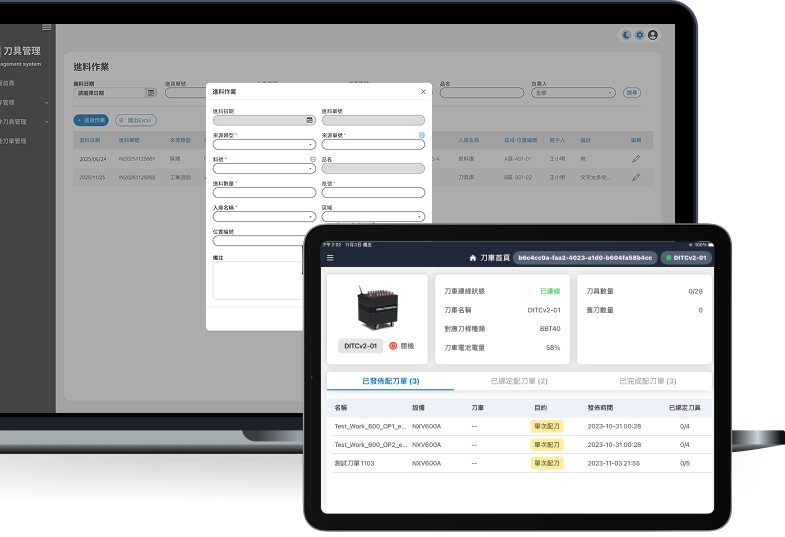
Patented Smart Tool Cart & Line-Side Delivery Management

  • Work order binding and tool verification to prevent wrong delivery or installation
  • Record tool operators for increased consistency and traceability
4

Tool Measurement, Auto Calibration, & Offset Management

  • Automatic measurement of tool length/diameter to avoid manual input errors
  • Ensures machining accuracy and settings consistency
5

CNC Tool Usage Monitoring & Life Management

  • Real-time monitoring of tool usage count or time
  • Lifespan warnings to prevent breakage, omission, and unexpected downtime
6

Tool Scrap Tracking & Full Life Cycle Management

  • Complete record from issuance to scrapping for full tool life cycle
  • Export records for analysis to assist engineering improvements and procurement decisions
7

Inventory Overview & Procurement Forecasting

  • Integrate tool and inventory data to track consumable usage and support procurement decisions
  • Analyze consumption records, predict replenishment needs, and reduce risks of shortages and overstock

DS Tool Management System Workflow

01
Test Cut

Test Cut

Establish standardized tool/inserts specifications, benchmark life, and machining parameters through test cuts, forming a standard tool table shared by all work orders.
02
Replenishment

Replenishment

Work orders display required tool/insert quantities and, based on inventory and life, provide procurement and restocking suggestions to ensure machining continuity and reduce shortage risks.
03
Storage

Storage

Tools are stored in the tool room or smart vending machine (either or both); the system auto-updates batch, life, and inventory status.
04
Issuance

Issuance

Inserts and consumables are issued by tool room staff or taken from vending machines, with traceable issuance records.
05
Tool Assembly & Measurement

Tool Assembly & Measurement

  • Tools are assembled per work order with operator and batch records
  • Tool measuring instruments measure length and diameter, generating offset data for CNC use
06
Smart Delivery

Smart Delivery

Manual Version – Mobile Scanning
  • -Staff use app to scan machine and tool QR Codes by delivery order, confirming machine, tool, and position
  • -The DS SMB system matches tool list and CNC machine status to ensure correct delivery, avoiding errors or incorrect installations
Advanced Version – AMR Smart Tool Cart
  • -AMR smart tool cart delivers by work order, scanning machine QR Code before delivery, using DS SMB to obtain CNC status and tool magazine info
  • -Verifies tool identity, target machine, and position before delivery to prevent wrong or incorrect tool installations
Life monitoring
07
CNC Tool Mounting

CNC Tool Mounting

  • Before mounting, DS SMB matches CNC status and tool list; only correct matches are allowed to mount
  • Automatically imports tool length and diameter measured into CNC, ensuring consistent offset settings and reducing human error
08
Tool Change/Regrinding

Tool Change/Regrinding

  • System monitors tool wear and life during processing, and recommends tool change; re-ground tools can be re-measured and stored
09
Life Data Analysis

Life Data Analysis

Based on life monitoring, customized AI can automatically analyze cost and brand efficiency
auto/management/pic11

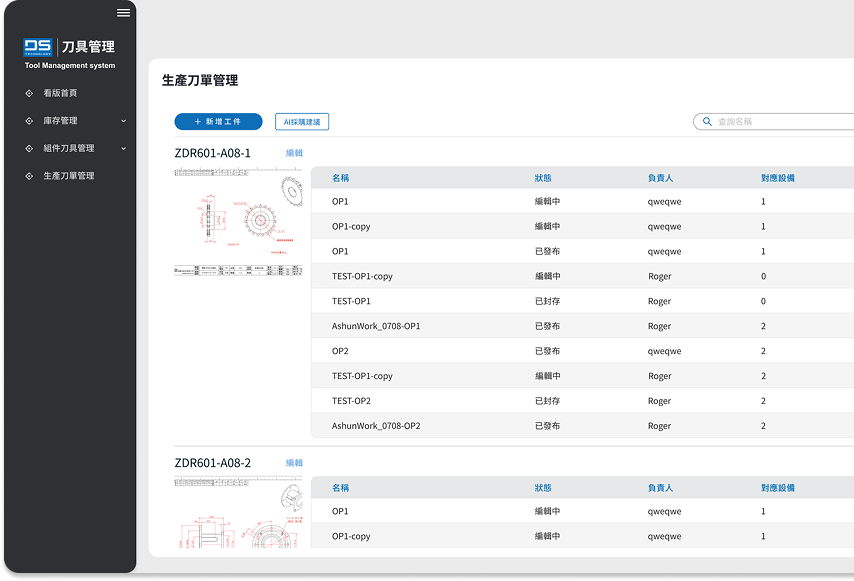
Establish Standard Tool List by Test Cut

Through test cut operations, tool and insert specifications, benchmark life, and machining parameters are established, creating a standardized tool list for consistent tool configuration and use across all work orders and processes.
  • Establish Standardized Tool Models and Lists
    The system converts test cut results into unified tool models, including holder model, insert specifications, length, diameter, and life requirements.
  • Record Benchmark Life and Machining Parameters
    Final producible conditions after test cuts are fully recorded, ensuring consistent and stable follow-up machining.
  • Foundation for Subsequent Processes
    All tool-related tasks—expansion, issuance, assembly, measurement, and CNC setup—automatically reference this tool list for accuracy.
  • Reduce Errors and Staff Dependency
    Standardized tool lists prevent different users from creating inconsistent data, reducing errors, and improving process uniformity.
  • Version Management Support
    When tool lists are updated, all factory work orders (with MES/integration) automatically use the latest version, preventing production errors from outdated lists.
auto/management/pic12
auto/management/pic13

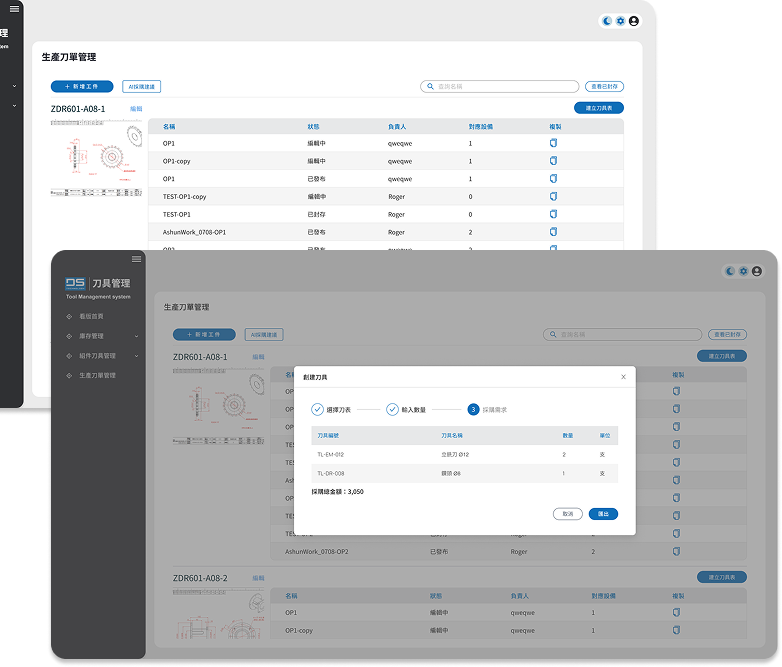
Expand Tool Requirements and Replenishment Suggestions by Tool List

The system expands tools and insert configurations needed for each process step based on standardized tool tables for the workpiece, combines stock levels, life, and usage records, and provides restocking and procurement suggestions to maintain machining continuity and reduce shortage risks.

  • Expand Tool List Requirements
    The system expands actual requirements for each process rapidly based on the standard tool list for the workpiece, serving as the basis for subsequent preparation and replenishment planning.
  • Real-Time Inventory Comparison & Availability Judgement
    Instantly compares current inventory, issued amounts, remaining tool life, and safety threshold to determine tool availability, reducing shortage or misuse risks.
  • Restocking and Procurement Suggestions
    Provides replenishment and procurement suggestions based on tool list requirements and real stock to help managers pre-plan supply needs.
  • Procurement List and Restock Notification
    System can directly generate procurement suggestions or restock notifications, establishing a clear and actionable tool supply process.

Insert Storage and Batch Traceability

Based on the standard tool list and expanded requirements, inserts can be stored in the tool room or smart vending machines or both. The system creates insert batches, life benchmarks, and inventory quantities upon storage to support subsequent issuance, usage control, and restocking management.
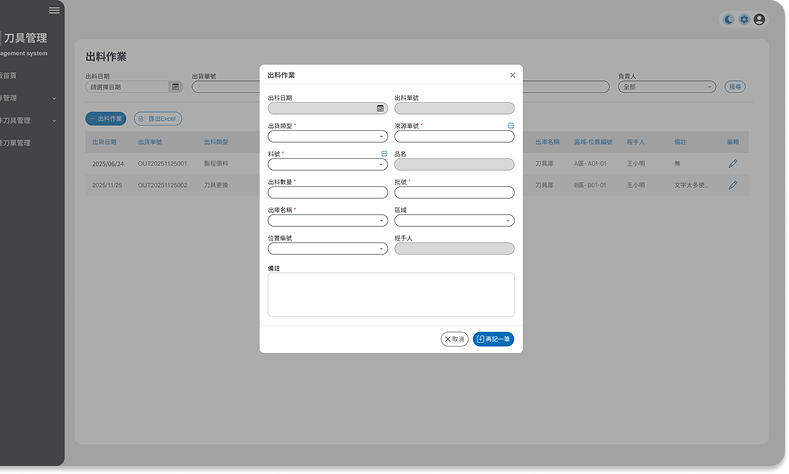
  • Expand Insert Requirements by Tool List
    System calculates required insert types and quantities for each process, based on standard tool lists for the workpiece, preventing over-procurement due to unclear requirements.
  • Requirements and Safety Stock Comparison
    Compares tool list requirements, current stock, and safety thresholds to determine the need for insert storage or restocking, ensuring uninterrupted production and reducing stock capital occupation.
  • Insert Stock Quantity Control
    Storage amount is calculated by actual need and safety stock gap, preventing overstock in one go and supporting minimum stock supply for real demand.
  • Insert Batch and Cost Traceability
    Batch number and cost are recorded at storage, allowing tracking of each batch’s usage and consumption for cost analysis and abnormal consumption review.
  • Reduce Idle Stock and Scrap Risk
    Tool list requirement and safety stock mechanisms prevent misjudgment leading to expired, idle, or unnecessary scrapped inserts, enhancing usage efficiency and procurement effectiveness.
auto/management/pic14
auto/management/pic15

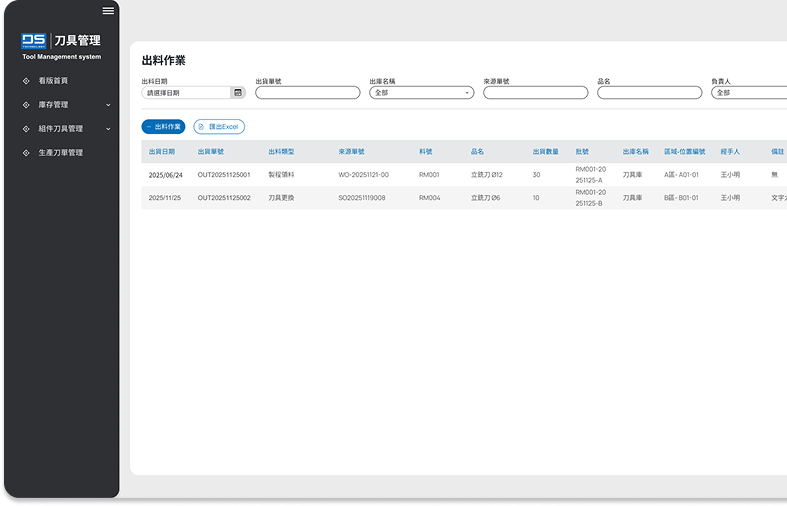
Insert/Consumable Issuance

Based on the standard tool list and expanded requirements for the workpiece, inserts and consumables can be issued by tool room staff or vending machines. The system records complete operator, item, quantity, and batch data for each issuance to ensure full traceability for assembly, usage, and tool life tracking.

  • Supports Manual and Vending Machine Dual Issuance
    Inserts and consumables can be issued manually by tool room staff, automatically from vending machines, or both, balancing management flexibility and efficiency.
  • Automatic Issuance Record Creation
    Each issuance records operator, time, insert type, batch, and quantity, building a full log as a basis for cost analysis and abnormal consumption review.
  • Issuance Control to Reduce Waste
    System compares issuance against standard tool list and requirements to avoid mis-issuance, repeats, or excessive non-essential issuance, helping control insert consumption costs.
  • Real-Time Inventory and Safety Stock Update
    Deducts stock immediately after issuance, updating tool room and vending machine inventory synchronously, checking against safety thresholds to ensure uninterrupted but non-overstocked production.
  • Restock and Storage Suggestions
    System gives restocking and storage suggestions according to tool list needs, actual inventory, and safety stock gaps, supporting minimum necessary inventory for actual machining requirements.
  • Batch and Shelf-Life Traceability
    Supports batch and shelf-life management for inserts, tracking issues by batch, shelf-life risk, or abnormal usage, reducing scrap and quality risk.

Precision Delivery by Smart Tool Cart

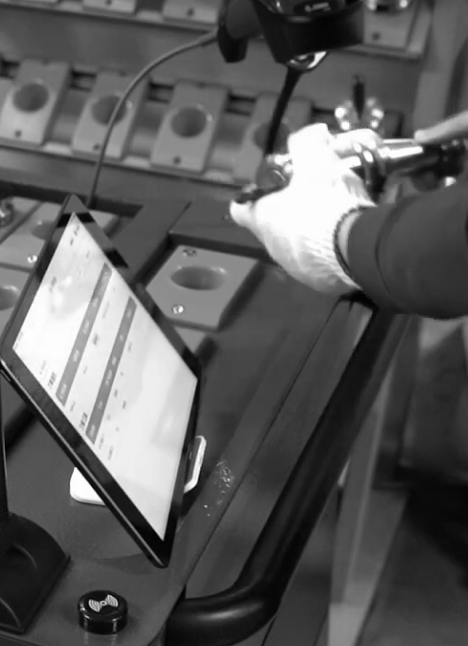
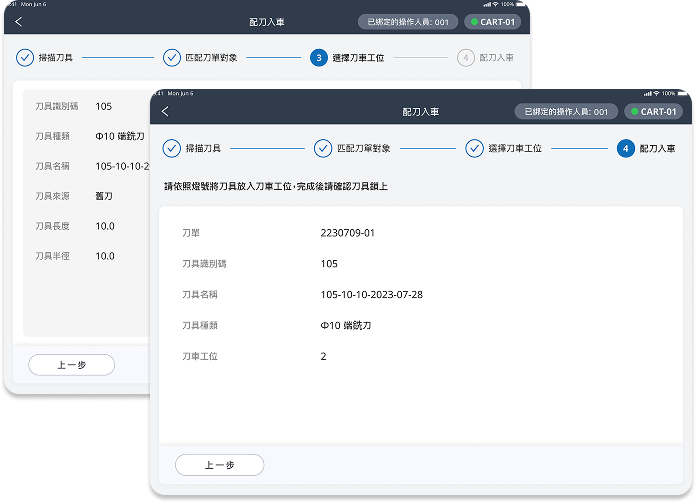
The smart tool cart delivers tools according to delivery orders, scanning the machine’s QR code before mounting to confirm the target machine and match tool identities and positions, ensuring tools are delivered to the correct machine and position according to the standard table and machine status, preventing incorrect or misplaced tools.
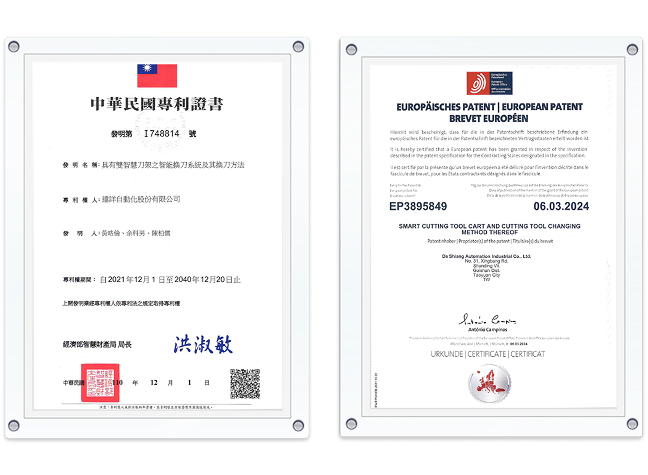
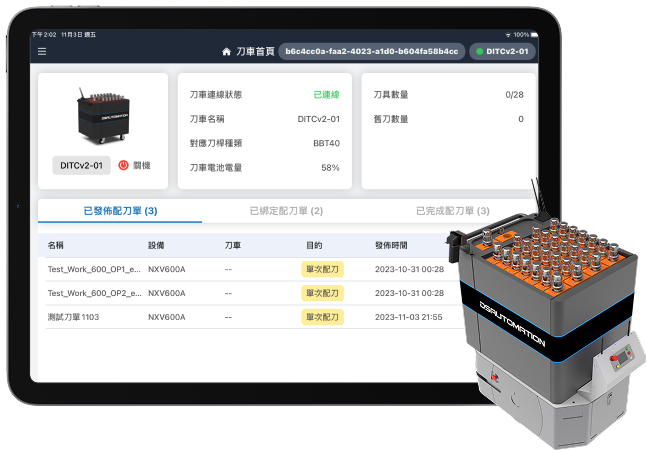
  • Tool Delivery Orders Guide Delivery
    • Manual Version (Standard)
      Smart tool cart guides delivery by tool delivery order, with operators pushing to the specified machine or workstation, ensuring delivered tools conform to the standard list and actual requirements to avoid manual misinterpretation.
    • AMR Integration (Optional)
      On the standard push-cart configuration, the system can be optionally integrated with AMR per factory demand for autonomous walking and unmanned delivery.
  • Machine QR Code Confirmation and Matching
    Every machine is marked with a unique QR code; scanning during delivery confirms the target machine to ensure correct delivery and avoid errors or misplacement.
  • Machine Status Integration and Tool Comparison
    The system integrates DS SMB machine communications to master live tool status, comparing tool table requirements and machine configuration before delivery and mounting, preventing duplicate or unnecessary deliveries.
auto/management/pic16
  • Tool Identity Verification and Status Comparison
    During delivery, tool codes, batches, and remaining life are checked to ensure correct specification and conditions, preventing wrong, missing, or mixed tools.
  • Tool Logistics Tracking and Operator Responsibility
    Record complete delivery and recovery logs from the tool room to machine, binding operator info to create clear and traceable logistics and responsibility records.
  • Error-Proof Delivery and Instant Write-Back
    If delivered tools don’t meet requirements or have anomalies, the system instantly alerts and blocks error delivery; delivery and recovery are synchronously written back to ensure inventory and life info consistency.
auto/management/pic17

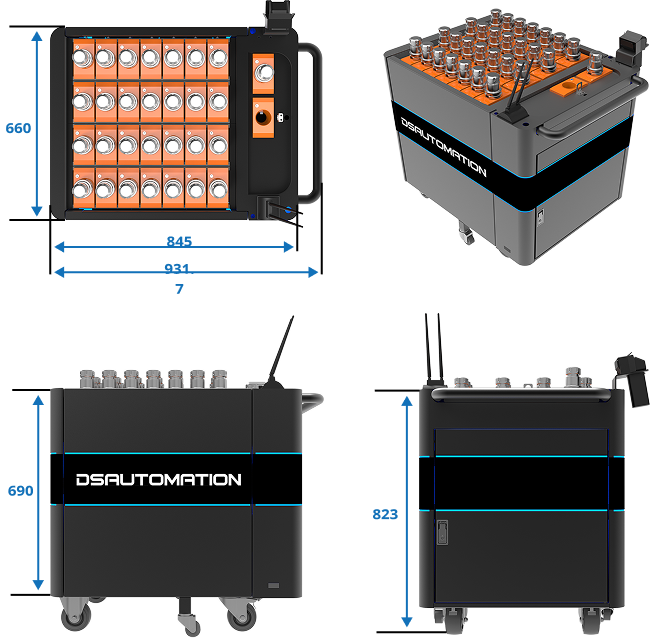
Smart Tool Cart Specifications

  • Delivery Methods
    • - Standard configuration: manual push smart tool cart
    • - Optional: AMR autonomous mobile integrated version
  • Tool Identification
    Supports QR code or RFID; can be configured for either or both options
  • Position Sensing and Error-Proofing
    Each tool position equipped with sensors to detect placing/removal in real-time; incorrect retrieval triggers a buzzer warning
  • Operator Management
    Define operators by name, support for QR code or RFID staff lock, all operations are traceable
  • Communication & System Integration
    Wi-Fi wireless communication, real-time data sync with DS SMB and CNC machines
  • User Interface
    Equipped with tablet displaying tool delivery orders, machines, and position info
auto/management/pic18
auto/management/pic19

CNC Tool Mounting Recognition & Auto Compensation Import

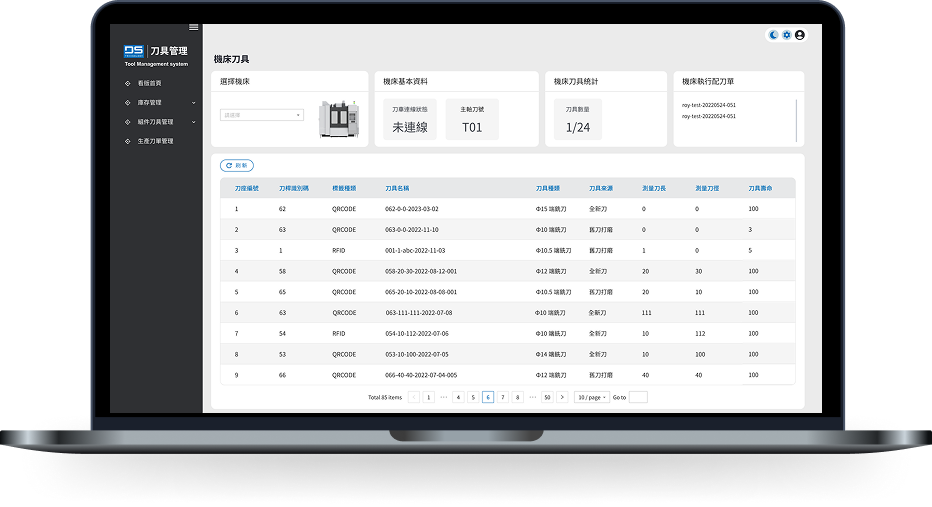
Before mounting, the CNC compares tool code, tool life, and corresponding tool table info and only allows correct tools to be mounted; after mounting, system auto-imports tool length and diameter measured by tool measuring instrument into the CNC, ensuring tool recognition and compensation settings are consistent while preventing manual input errors and improving machining stability.
  • Pre-Mount—Tool Identity & Status Verification
    CNC and DS system compare tool code, batch, and remaining life; only conforming tools are allowed to be mounted to avoid incorrect or nonconforming tool mounts.
  • Post-Mount—Auto Compensation Import
    System automatically imports measured tool length and diameter compensation to the CNC, requiring no manual input and ensuring consistent, correct compensation data.
  • Avoid Manual Input & Machining Error-Proofing
    All tool tasks—expansion, issuance, assembly, measurement, and CNC setup—automatically reference this tool list for accuracy.
  • Stable and Consistent Machining Parameters
    All tool compensation and settings are applied by standard process, ensuring consistency and repeat precision across different machines and lots.
  • Complete Mount & Compensation Traceability
    System records each mount, tool identity, compensation value source, and operator for complete, traceable tool and machining history.
  • Deep CNC Bidirectional Data Integration (SMB)
    All machine status and tool info are exchanged and synchronized via SMB with the CNC, including tool IDs, position status, compensation values, and usage, ensuring data consistency as reliable basis for mounting, error-proofing, and machining execution.
auto/management/pic20
auto/management/pic21

Life Monitoring, Tool Change & Re-Storage

System continually monitors tool life and records tool changes, regrinding, and restocking status; cumulative usage and life data serve as references for tool life improvement and machining parameter optimization, forming complete tool life cycle management.

  • Real-Time CNC Tool Life Sync
    System reads tool use time, process count, and on-machine status from CNC in real time through DS SMB, using this as the only basis for life determination.
  • Threshold Judgement & Tool Change Decision
    Compares actual usage with life rules from the standard tool list to automatically determine change-over threshold, preventing quality/equipment risks from overuse.
  • Tool Change Write-Back & Status Update
    After tool change, system writes back off-machine status, actual life, and work order info to ensure CNC and tool management data consistency.
  • Regrinding, Re-Measurement & Re-Storage
    Reusable tools are re-stored after regrinding and remesurement, with updated life and size data, supporting subsequent work orders.
  • Life Data Accumulation & Cost Analysis
    Continually accumulates actual life, regrind times, and scrap records as a basis for life optimization, regrind strategy adjustment, and overall tool cost control.

© Da Shiang Technology Co., Ltd | DS Technology 2025